
infisical
How We Migrated from Local Env Chaos to Infisical—AI-Led, MCP-Powered
Our journey from scattered secrets across various environments to a unified Infisical setup, with AI-driven migrations and MCPs.

How We Migrated from Local Env Chaos to Infisical—AI-Led, MCP-Powered
TL;DR: We went from secrets scattered across .env.local, Fly.io, and two GitHub Action repos to a single Infisical source of truth. An AI agent drove the migration using MCPs. Zero manual secret setup now. Here's how.
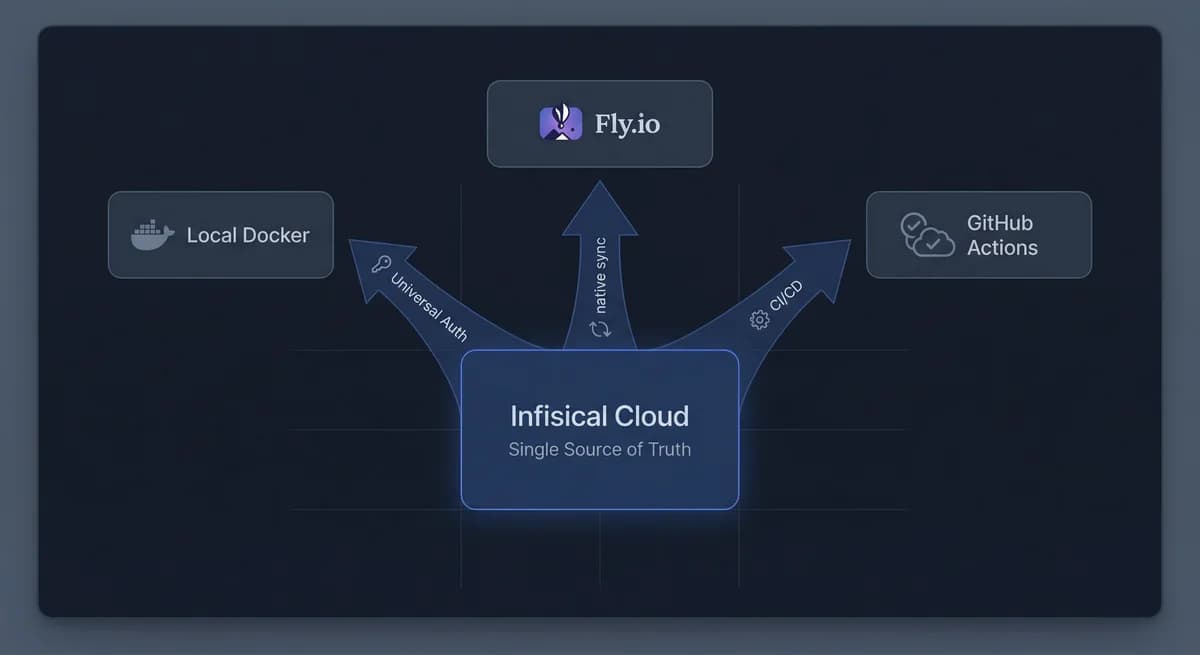
The Before State
Secrets were everywhere. And nowhere consistent.
- Local dev:
.env.localcopied from someone else's machine or a wiki. Sometimes committed by accident. Often stale. - Production (Fly.io):
fly secrets setrun manually. 18 secrets. No record of who set what or when. - CI/CD: GitHub Actions secrets in two repos—
k2k-mega-foundation(deploy) andk2k-sidekick(release). Same keys, different values sometimes. Or missing. - Rotation: Update a Supabase key? That's four places. Five if you count the wiki.
No audit trail. Drift between environments. The classic mess.
Why Infisical (And Why Now)
We needed one place to store secrets and one way to push them out. Infisical gives you:
- Single source of truth — Update once, sync everywhere.
- Native integrations — Fly.io and GitHub Actions sync directly from Infisical. No custom scripts.
- MCP server — The Infisical MCP lets an AI agent read, create, update, and delete secrets without you touching a UI.
That last point mattered. We didn't want a migration we'd babysit. We wanted the agent to do it.
MCPs: The Engine of the Migration
Model Context Protocol (MCP) turns infrastructure into structured tools. Instead of parsing CLI output or clicking dashboards, the agent calls tools and gets JSON back.
Infisical MCP
- list-secrets, get-secret, create-secret, update-secret, delete-secret. Project and environment aware. We used it to:
- Audit what we had in
.env.localand compare to Infisical - Add missing secrets
- Verify sync targets
- Audit what we had in
Fly MCP
- listSecrets, setSecrets, deploySecrets, getLogs, listMachines. We used it to:
- Check Fly.io secrets before and after Infisical sync
- Confirm deployment after the cutover
- Debug when something looked wrong
GitHub MCP
- We used it to confirm Actions secrets were populated from Infisical. No more manual
gh secret set.
The agent didn't guess. It called tools, got data, and acted on it.
Phase 1: Centralize and Sync
Goal: Get all secrets into Infisical and auto-sync to Fly.io and GitHub Actions.
- Create Infisical project — Two environments: local (dev) and prod (Fly + CI).
- Migrate secrets — Agent used Infisical MCP to
create-secretfor each key we had in.env.localand Fly. 18 secrets in prod, 14 in local. - Wire integrations:
- Fly.io: Infisical native integration. Select app
k2k-foundation, connect, enable auto-sync. Done. - GitHub Actions: Same. Connected
k2k-mega-foundationandk2k-sidekickto Infisical prod. Overwrite mode—Infisical is source of truth.
- Fly.io: Infisical native integration. Select app
No bash one-liners. No bespoke sync scripts. Infisical does it.
Result: Rotate a secret in Infisical → it propagates to Fly.io and both GitHub repos. One change, four targets.
Phase 2: Kill the Manual Sync for Local Dev
Phase 1 still had a wart: local dev required npm run env:sync before docker compose up. A human (or agent) had to remember it.
We fixed that with a Docker entrypoint that fetches secrets at container startup:
#!/bin/bash
set -e

# Authenticate with Infisical Universal Auth
INFISICAL_TOKEN=$(infisical login \
  --method=universal-auth \
  --client-id="${INFISICAL_UNIVERSAL_AUTH_CLIENT_ID}" \
  --client-secret="${INFISICAL_UNIVERSAL_AUTH_CLIENT_SECRET}" \
  --silent --plain 2>/dev/null)

[ -z "$INFISICAL_TOKEN" ] && { echo "Infisical auth failed"; exit 1; }
export INFISICAL_TOKEN

# Export secrets to temp file, source, then exec
infisical export --projectId=YOUR_PROJECT --env=local --format=dotenv > /tmp/.env.infisical
set -a && source /tmp/.env.infisical && set +a
rm -f /tmp/.env.infisical

exec "$@"
Dockerfile.dev installs the Infisical CLI and sets this as ENTRYPOINT. Universal Auth credentials live in ui/.env (gitignored). Developer runs docker compose up—secrets load automatically. No .env.local. No sync step.
- Before:
npm run env:sync && docker compose up(2 commands) - After:
docker compose up(1 command)
Secrets never touch disk in a committed file. Refresh? docker compose restart webui.
The Numbers
| Metric | Before | After |
|---|---|---|
| Places to update a secret | 4+ | 1 |
| Manual sync steps | 2 (local + prod) | 0 |
| Secrets in git | Risk of .env.local commit | 0 |
| Audit trail | None | Infisical logs everything |
| Sync targets | — | 4 (local Docker, Fly.io, 2× GitHub) |
MCP + AI: Why It Worked
An agent can't migrate secrets by clicking UIs. It needs structured access. MCPs gave us that:
- Infisical MCP — Agent listed existing secrets, created new ones, verified sync behavior.
- Fly MCP — Agent checked
listSecretsbefore/after, confirmed deploys, read logs when something failed. - GitHub MCP — Agent verified Actions secrets were populated.
We wrote instructions. The agent executed. No back-and-forth with dashboards. No "I think it's synced."
What You Need to Replicate This
- Infisical account — Free tier is enough to start.
- Universal Auth — For Docker (local) and MCP. Create a Machine Identity, get Client ID + Secret. One identity for CLI/entrypoint, one for the Cursor Infisical MCP if you want the agent to manage secrets.
- Infisical MCP in Cursor — Add to
~/.cursor/mcp.json:"infisical": { "command": "npx", "args": ["-y", "@infisical/mcp"], "env": { "INFISICAL_UNIVERSAL_AUTH_CLIENT_ID": "your-client-id", "INFISICAL_UNIVERSAL_AUTH_CLIENT_SECRET": "your-client-secret" } } - Fly + GitHub integrations — In Infisical, connect Fly.io and GitHub. Point them at your app and repos. Enable auto-sync.
Takeaways
- MCPs make infrastructure automatable. Structured tools beat scraping CLIs or UIs.
- Infisical as hub works. One update, four destinations. No custom glue.
- Docker entrypoint + Universal Auth removes the local sync step entirely. Secrets load at startup. No files to manage.
- AI-led migration is real. With the right tools (MCPs), an agent can run the migration, verify syncs, and confirm deploys. You define the plan; the agent executes it.
If you're still juggling .env.local, fly secrets, and gh secret set, it's worth a weekend to consolidate. Infisical + MCPs makes it tractable. And once it's done, you never touch secret sync again.
FRUS — Technical consultancy. We build production systems and write what works.
Related paths